MOD2

Normalize, Sort & Assign Codes

Turn inconsistent names into a predictable physical storage system.

MOD2 applies reusable artist-sorting rules, handles exceptions, and assigns local copy numbers that can become practical SKU and storage codes. The result is a master collection that sorts correctly on screen and can also be found quickly on the shelf.

  • Normalize individual artists, bands, classical names and special cases
  • Save reusable sorting rules and apply them to selected records
  • Flag new artists, conflicts and records requiring review
  • Assign local copy numbers, SKU references and storage identifiers
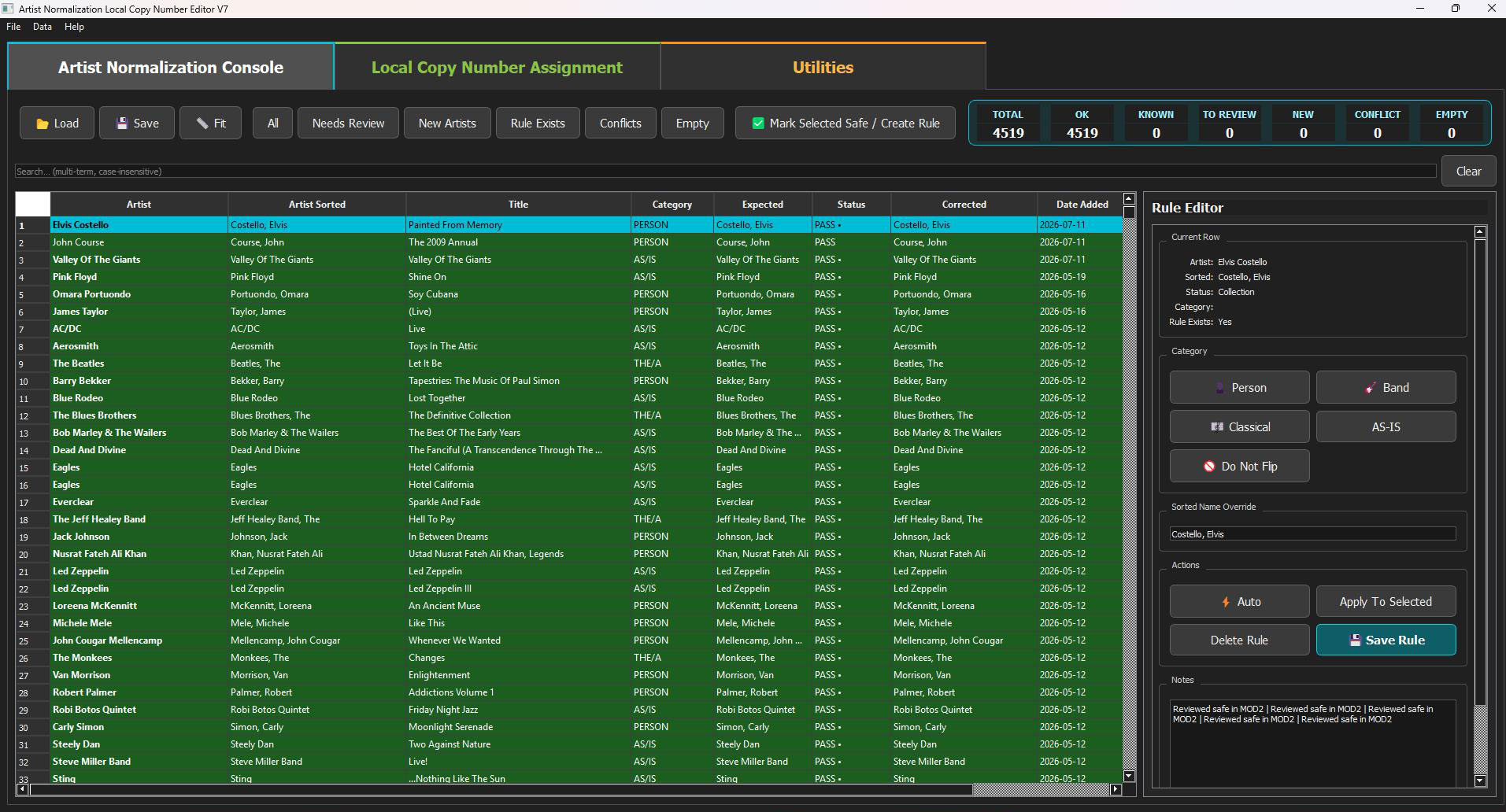
Actual MOD2 Artist Normalization Console with sorted artist names, status checks and Rule Editor
Reusable sorting rulesDefine how each artist should appear in Artist Sorted, then save the rule for future records.
Instant quality statusSee OK, known, review, new, conflict and empty counts before saving.
Rule EditorChoose Person, Band, Classical, AS-IS or Do Not Flip and override the result when needed.
Review only exceptionsFilter new artists, conflicts and unresolved names instead of checking every row.
Copy number & SKU assignmentUse the Local Copy Number workspace to create consistent codes for physical storage and selling workflows.

From display order to physical location

One set of rules. Two problems solved.

MOD2 keeps names consistent in the database and connects digital records with the real item stored in your collection.

A–Z

Sorting & Normalization

Convert inconsistent artist names into a predictable Artist Sorted value without destroying the original artist field.

  • Person: Elvis Costello → Costello, Elvis
  • Band and group names kept together
  • Classical and special-case handling
  • Saved rules reused automatically
+
SKU

Copy Numbers & Storage Codes

Assign a unique local identifier to each physical copy so the database, shelf position and selling package refer to the same item.

  • Unique local copy number
  • SKU-ready reference for listings
  • Consistent shelf or box location
  • Safer handling of duplicate releases
MOD2 artist table showing original artist, Artist Sorted, category, expected result and status
Normalize

Preserve the original. Standardize the sort order.

The source Artist value stays intact while MOD2 calculates and stores a clean Artist Sorted value. Status colours make it easy to distinguish passing rules from new names or cases that need attention.

ORIGINAL ARTISTARTIST SORTEDEXPECTEDSTATUS
Control

Build rules once, then reuse them everywhere.

The Rule Editor lets you classify the current artist, correct the proposed sorted name, apply it to selected rows and save a reusable rule. Filters isolate new artists, conflicts, empty values and anything marked for review.

PERSONBANDCLASSICALAS-ISDO NOT FLIP
MOD2 Rule Editor with artist category controls, sorted-name override and Save Rule action
MASTER RECORDRelease + CopyOne physical item
→
LOCAL COPY NUMBERUnique IDNever confused with another copy
→
SKU / STORAGEListing & ShelfFind, pack and sell faster
Locate

Connect the spreadsheet row to the item on the shelf.

A local copy number distinguishes physical copies even when they share the same Discogs release. The same identifier can be reused as an SKU reference or incorporated into a storage code, helping you find the exact item when it sells.

COPY NUMBERSKUSHELFBOXBIN

From inconsistent names to a shelf-ready collection

Aa

Load

Open the current master collection

⇄

Normalize

Calculate consistent Artist Sorted values

⚑

Review

Resolve new names and conflicts

✓

Save Rules

Reuse approved decisions automatically

#

Assign

Create copy numbers and SKU references

▦

Store

Connect every record to its physical location

A consistent name and a unique code make every item easier to manage, find and sell.

MOD2 prepares the master collection for enrichment, inventory control, marketplace listings and reliable order fulfilment.